
README.md 9.0 KB
L-CNN — End-to-End Wireframe Parsing
This repository contains the official PyTorch implementation of the paper: Yichao Zhou, Haozhi Qi, Yi Ma. "End-to-End Wireframe Parsing." arXiv:1905.03246 [cs.CV].
Introduction
L-CNN is a conceptually simple yet effective neural network for detecting the wireframe from a given image. It outperforms the previous state-of-the-art wireframe and line detectors by a large margin. We hope that this repository serves as an easily reproducible baseline for future researches in this area.
Main Results
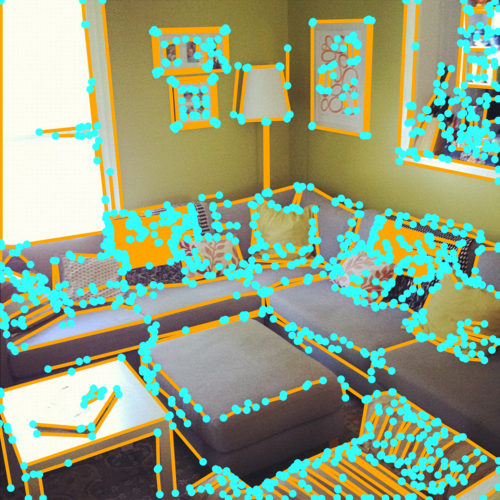
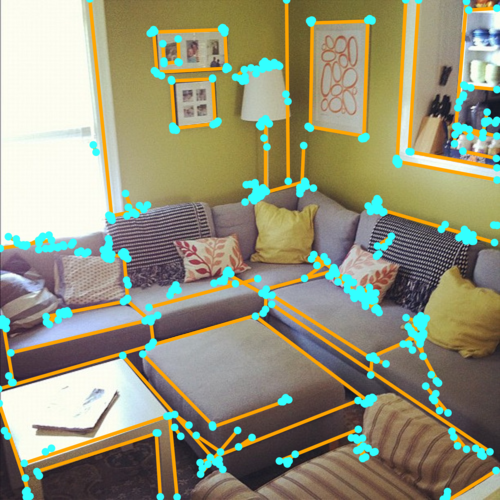
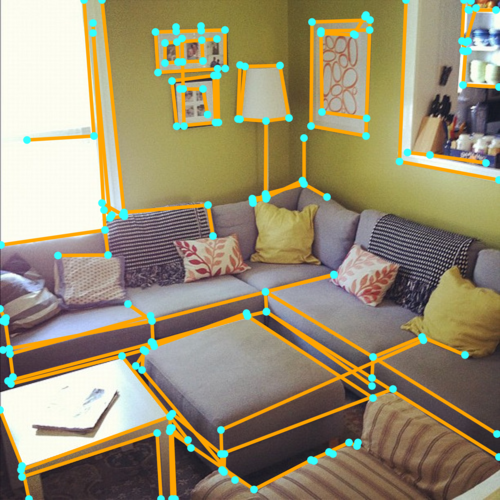
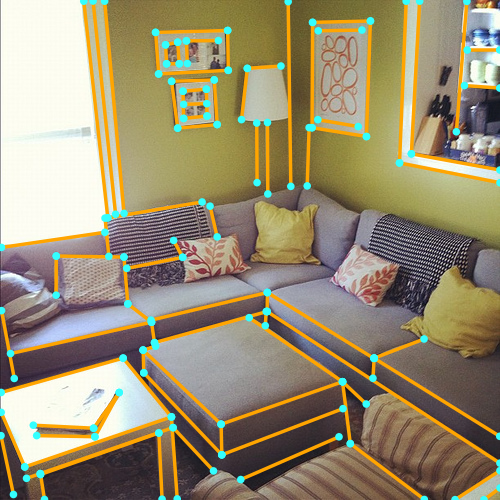
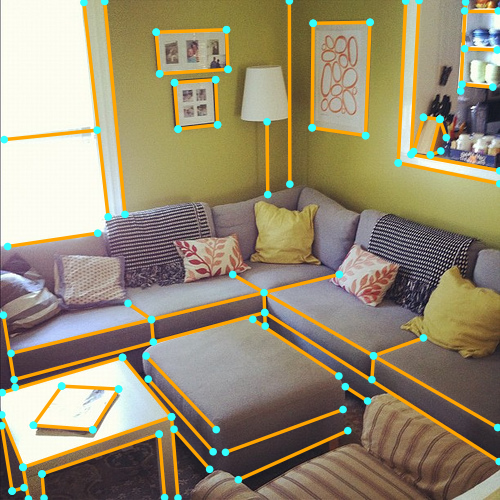
Qualitative Measures
 |
 |
 |
 |
 |
|---|---|---|---|---|
| LSD | AFM | Wireframe | L-CNN | Ground Truth |
Quantitative Measures
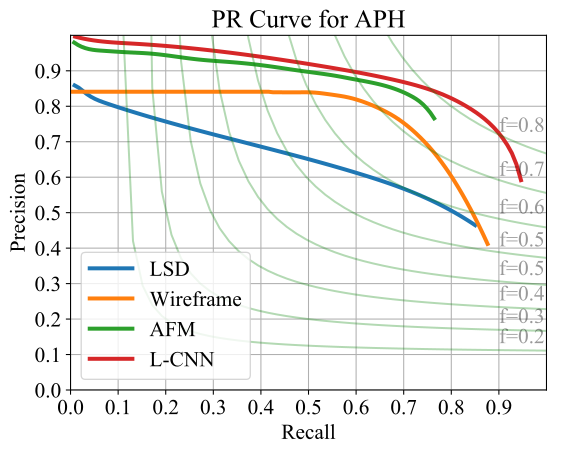
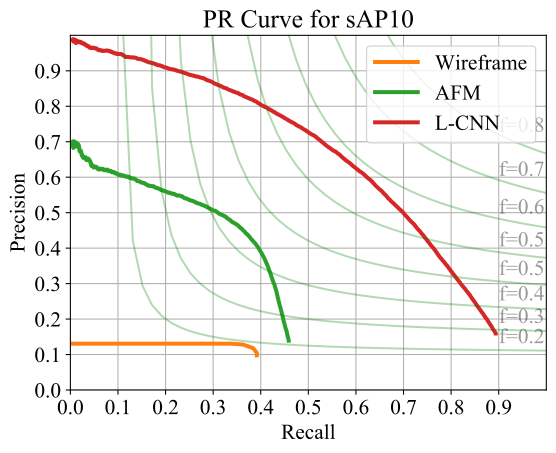
The following table reports the performance metrics of several wireframe and line detectors on the Wireframe dataset.
| | Wireframe (sAP10) | Wireframe (APH) | Wireframe (FH) | Wireframe (mAPJ) |
| :--------------------------------------------------: | :--------------------------------: | :-----------------------------: | :----------------------------: | :------------------------------: |
| LSD | / | 52.0 | 61.0 | / |
| AFM | 24.4 | 69.5 | 77.2 | 23.3 |
| Wireframe | 5.1 | 67.8 | 72.6 | 40.9 |
| L-CNN | 62.9 | 82.8 | 81.2 | 59.3 |
Precision-Recall Curves
Code Structure
Below is a quick overview of the function of each file.
########################### Data ###########################
figs/
data/                           # default folder for placing the data
    wireframe/                  # folder for Wireframe dataset (Huang et al.)
logs/                           # default folder for storing the output during training
########################### Code ###########################
config/                         # neural network hyper-parameters and configurations
    wireframe.yaml              # default parameter for Wireframe dataset
dataset/                        # all scripts related to data generation
    wireframe.py                # script for pre-processing the Wireframe dataset to npz
misc/                           # misc scripts that are not important
    draw-wireframe.py           # script for generating figure grids
    lsd.py                      # script for generating npz files for LSD
    plot-sAP.py                 # script for plotting sAP10 for all algorithms
lcnn/                           # lcnn module so you can "import lcnn" in other scripts
    models/                     # neural network structure
        hourglass_pose.py       # backbone network (stacked hourglass)
        line_vectorizer.py      # sampler and line verification network
        multitask_learner.py    # network for multi-task learning
    datasets.py                 # reading the training data
    metrics.py                  # functions for evaluation metrics
    trainer.py                  # trainer
    config.py                   # global variables for configuration
    utils.py                    # misc functions
eval-sAP.py                     # script for sAP evaluation
eval-APH.py                     # script for APH evaluation
eval-mAPJ.py                    # script for mAPJ evaluation
train.py                        # script for training the neural network
post.py                         # script for post-processing
process.py                      # script for processing a dataset from a checkpoint
Reproducing Results
Installation
For the ease of reproducibility, you are suggested to install miniconda (or anaconda if you prefer) before following executing the following commands.
git clone https://github.com/zhou13/lcnn
cd lcnn
conda create -y -n lcnn
source activate lcnn
# Replace cudatoolkit=10.0 with your CUDA version: https://pytorch.org/
conda install -y pytorch cudatoolkit=10.0 -c pytorch
conda install -y tensorboardx -c conda-forge
conda install -y pyyaml docopt matplotlib scikit-image opencv
mkdir data logs post
Downloading the Processed Dataset
Make sure curl is installed on your system and execute
cd data
../misc/gdrive-download.sh 1T4_6Nb5r4yAXre3lf-zpmp3RbmyP1t9q wireframe.tar.xz
tar xf wireframe.tar.xz
rm wireframe.tar.xz
cd ..
If gdrive-download.sh does not work for you, you can download the pre-processed dataset
wireframe.tar.xz manually from Google
Drive and proceed
accordingly.
Processing the Dataset
Optionally, you can pre-process (e.g., generate heat maps, do data augmentation) the dataset from
scratch rather than downloading the processed one. Skip this section if you just want to use
the pre-processed dataset wireframe.tar.xz.
cd data
../misc/gdrive-download.sh 1BRkqyi5CKPQF6IYzj_dQxZFQl0OwbzOf wireframe_raw.tar.xz
tar xf wireframe_raw.tar.xz
rm wireframe_raw.tar.xz
cd ..
dataset/wireframe.py data/wireframe_raw data/wireframe
Training
To train the neural network on GPU 0 (specified by -d 0) with the default parameters, execute
python ./train.py -d 0 --identifier baseline config/wireframe.yaml
Pre-trained Models
You can download our reference pre-trained models from Google
Drive. This model was trained
with config/wireframe.yaml for 312k iterations.
Post Processing
To post process the outputs from neural network (only necessary if you are going to evaluate APH), execute
python ./post.py --plot --thresholds="0.010,0.015" logs/RUN/npz/ITERATION post/RUN-ITERATION
where --plot is an optional argument to control whether the program should also generate
images for visualization in addition to the npz files that contain the line information, and
--thresholds controls how aggressive the post processing is. Multiple values in --thresholds
is convenient for hyper-parameter search. You should replace RUN and ITERATION to the
desired value of your training instance.
Evaluation
To evaluate the sAP (recommended) of all your checkpoints under logs/, execute
python eval-sAP.py logs/*/npz/*
To evaluate the mAPJ, execute
python eval-mAPJ.py logs/*/npz/*
To evaluate APH, you first need to post process your result (see the previous section).
In addition, MATLAB is required for APH evaluation and matlab should be under your
$PATH. The parallel computing toolbox is highly suggested due to the usage of parfor.
After post processing, execute
python eval-APH.py post/RUN-ITERATION/0_010 post/RUN-ITERATION/0_010-APH
to get the plot, where 0_010 is the threshold used in the post processing, and post/RUN-ITERATION-APH
is the temporary directory storing intermediate files. Due to the usage of pixel-wise matching,
the evaluation of APH may take up to an hour depending on your CPUs.
See the source code of eval-sAP.py, eval-mAPJ.py, eval-APH.py, and misc/*.py for more
details on evaluation.
Citing End-to-End Wireframe Parsing
If you find L-CNN useful in your research, please consider citing:
@article{zhou2019end,
  title={End-to-End Wireframe Parsing},
  author={Zhou, Yichao and Qi, Haozhi and Ma, Yi},
  journal={arXiv preprint arXiv:1905.03246},
  year={2019}
}